Featured Post

Avoid Quarter 2 Blues: Save Time with a new Google Classroom

For those of you ending the quarter, now is the time to create a new Google Classroom for each of your classes. Organizing new classes will...

Friday, November 4, 2022

Jamming with Jamboard

If you haven't had much experience with Jamboard, it is basically an online whiteboard that is part of the Google suite. It works well on your Smartboard, Chromebooks, and other devices, and you can learn more about it here.

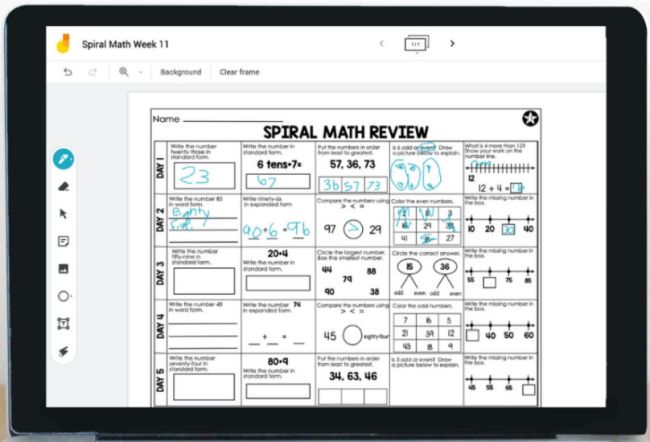
If you use Slides for many things, as I know many teachers do, then it would be logical to wonder why Jamboard would be worth learning and integrating. One compelling reason is the drawing functionality. Unlike slides, the drawing tools on Jamboard allow for easy annotation:

While this many not be compelling without a touch screen, if you have a Smartpanel, this allows you to take notes on a worksheet or picture without much more effort than pasting a screenshot or scan on the board:


Jamboard also allows you to keep adding new screens to a Jam, so if you wanted or needed to save and upload all the notes from class to Google Classroom, this process becomes a snap.

While many teachers don't recommend having the whole class on one Jamboard at the same time (no version history = less accountability), it is great for small group collaboration or organizing quick teacher-directed whole group activities.

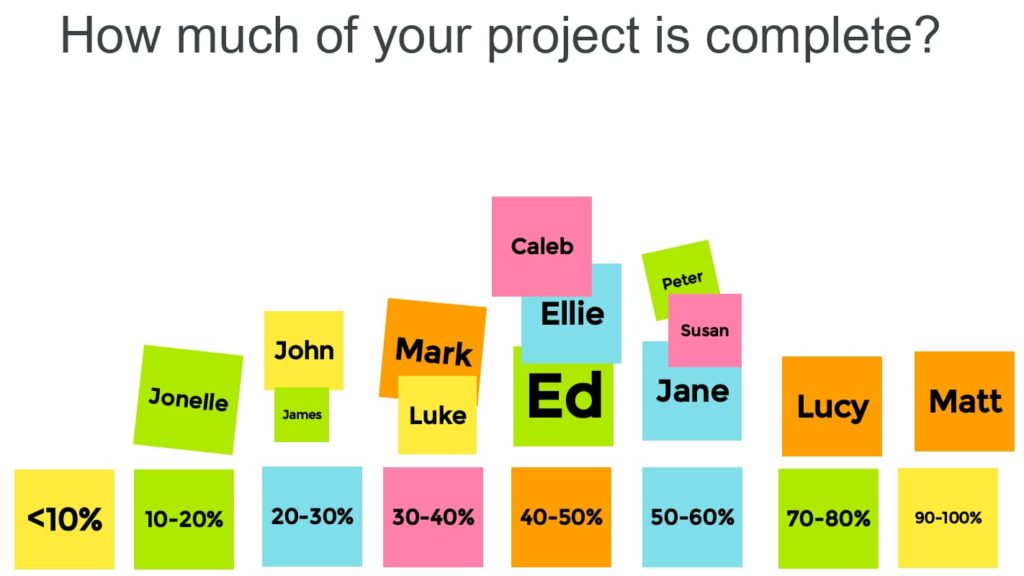
The sticky note function makes it easy for students to quickly contribute and organize ideas. This idea from Chromebook Classroom is so simple, yet it is useful for teachers as formative assessment data:


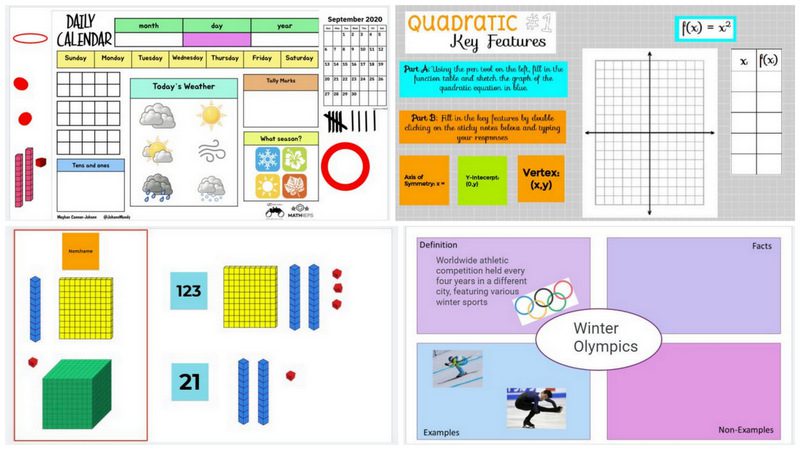
Jamboard makes it easy to manipulate objects on a screen, and if you check out this post from We Are Teachers and this post from Ditch That Textbook, you will find over 40 ready-made templates and ideas that will increase collaboration, manipulation, and accessibility. Why reinvent the wheel when someone has shared a Freyer model template or already made number cubes and calendar items?

If you are looking for something new, or you are just looking to save some time, check out the Jamboard templates that people are sharing.

If you want more ideas, you can also check out this free ebook from DitchThatTextbook with 10 Jamboard lesson ideas and templates.

Friday, October 28, 2022

WOW your Parents, Streamline your Practice

Parent-Teacher Conferences are coming up fast, and with so many options for connecting with parents, it helps to think about how you can use technology to streamline your preparation and leave your parents impressed.

Scheduling

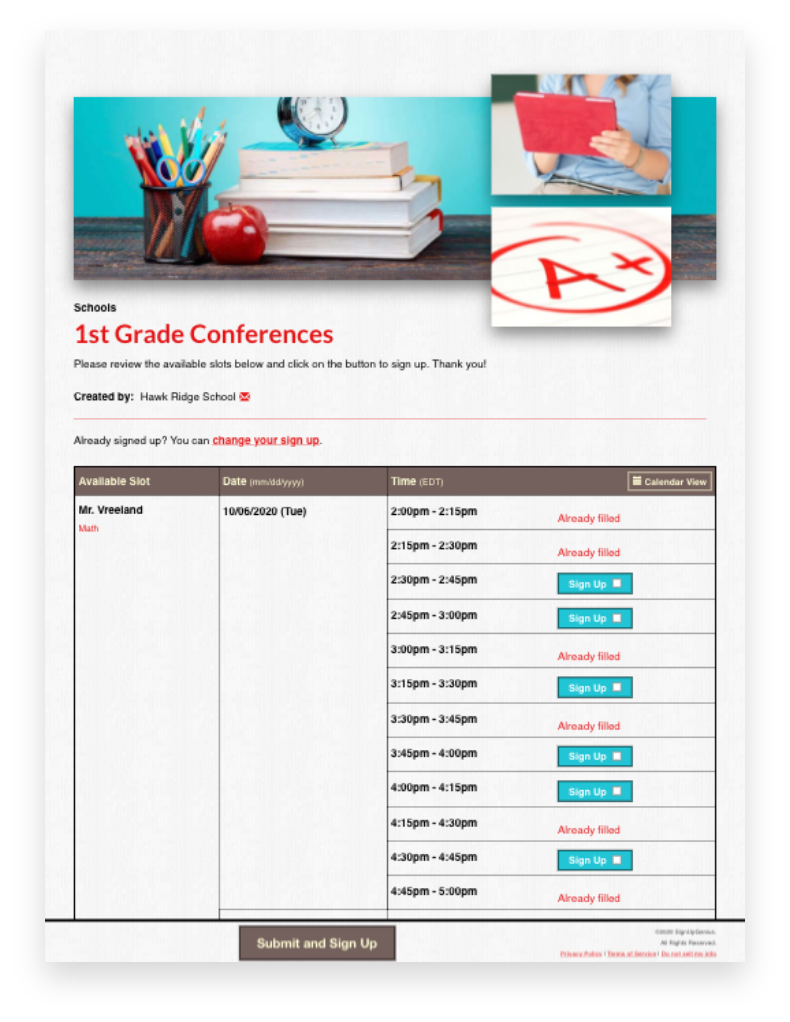
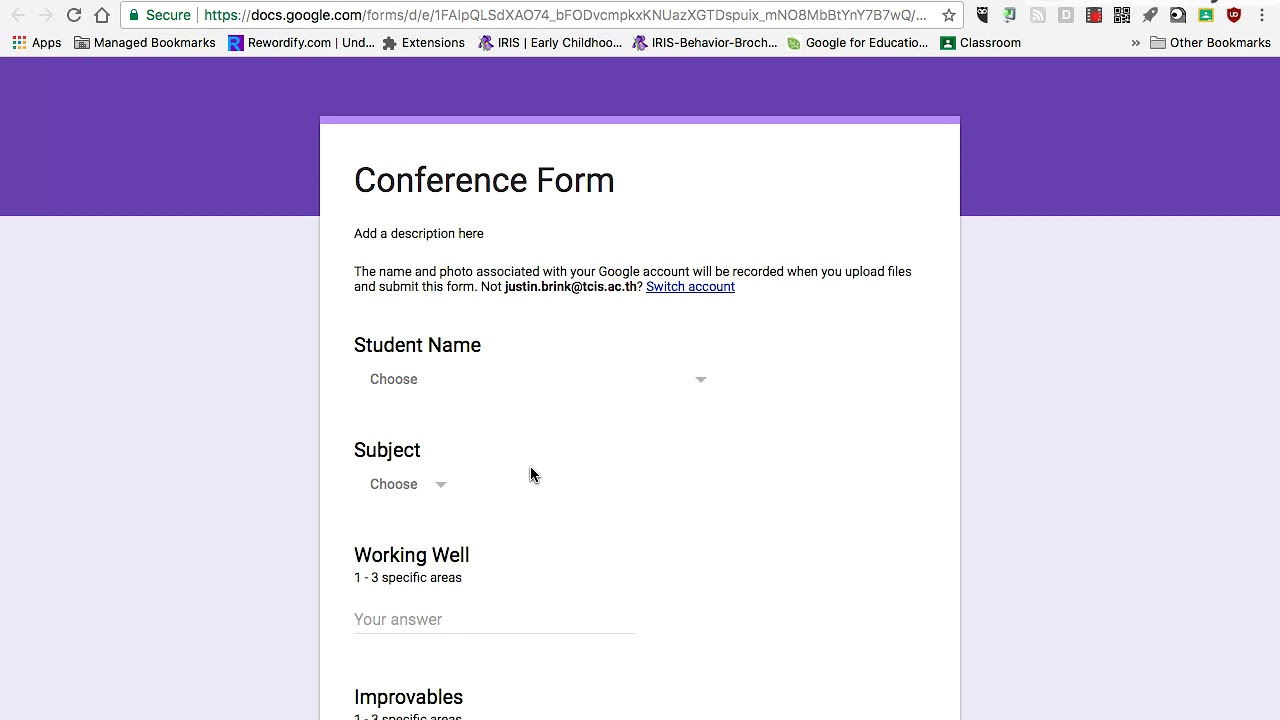
While Sign Up Genius continues to be a favorite for scheduling parent conferences, you can also use Google forms and Google calendar to set up appointments and share Meet links if parents are joining virtually. (For more on using Google forms with parents, see our previous post.) 

Online scheduling is great because it eliminates the "middle man" problems associated with sending papers back and forth. Additionally, using online appointments makes it easier for parents (and teachers!) to schedule, especially if they are coordinating conferences with multiple teachers. And of course, parents can always call/email and you can help them use these systems!

(As another a time-saving tip, printing out your electronic calendar or sign up is a great way to streamline sharing your conference log with your building administrators.)

Showcasing your Classroom

While open house is the best opportunity to allow parents to "see" what their kids experience every day, not every parent can make it. In advance of conferences, you can share insight into your class using digital tools. Several teachers have done virtual tours (check out this example from GHS!), which are not only great to record for parents, but also work great as an introduction for new students. 

And, if you want to empower your students and share the load, have a student tour challenge that asks your kids to collaborate to create a tour and/or compete to see who creates the best tour video.

Showing Student Work

Parents LOVE seeing what their students are doing. While some teachers may already have students creating Google Sites as part of a portfolio, others may simply have a paper folder of work. Some teachers have students complete a Google form or document that allows the students to choose what information they want to share with parents about their year so far. This is a great way to promote student self-assessment/metacognition and to increase parent engagement.

Some teachers have joined meetings with their phones, in addition to their computer, to have another camera to show offline work. One other great idea for sharing this with parents who are meeting virtually is to use a document camera. Especially when you have little learners who need to process a lot on paper, this allows you to talk about what you are seeing in student work with a visual reference for parents. (Click here for directions on using document cameras in Google Meets, or contact TLI.)


Supporting Parents

Some parents have a tricky relationship with school, whether because they are new to having students in the system, they have a language barrier, or they are carrying their own trauma from school. You might consider sending them preconference questions or materials to help them prepare.


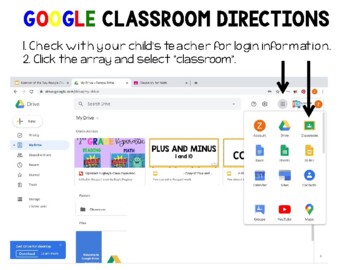
Especially as students transition to new schools and class set ups, parents may need more support to take advantage of your communications. If you use a tool like Remind to send messages home, Google Classroom for updates, or even if you use Infinite Campus to share progress, parents may need a set of directions or additional support to access  this. Be prepared with this during conferences, either by creating a follow-up email that you send with links or by having links to this important information that you can put in the chat to walk a parent through the process. If TLI can help direct you to the "best" tutorial videos for parents, let us know!

For more tips on preparing for Parent-Teacher Conferences, especially for new or nervous teachers, check out the Edvocate and the Resilient Educator.

What other tips do you have for great conferences? Add them to the Google Jamboard!

Friday, October 21, 2022

Unburdening the Brain & Shifting the Cognitive Load

There's been A LOT written and talked about recently in regards to "cognitive load"; brain science is showing us more about what does and doesn't work for learning, and the impacts of trauma (like a certain pandemic) and still being felt by our students.

A recent podcast from Truth for Teachers, "Help students do more with less effort using cognitive load theory", explains:

Cognitive load theory includes intrinsic, germane, and extraneous loads. Intrinsic load is the complexity inherent in the content. Instructional designers recognize that most of this load cannot be mitigated. Content load should not be confused with task or assignment load, which are addressed in the next two types.
In germane load, learners are integrating new information into an existing schema. Designers tend to increase this load since it helps ensure learning makes it to long-term memory. Finally, there is extraneous load, which designers seek to eliminate as much as possible. These are the other weights our students carry: distractions (environmental or internal), redundancy of content, and so forth that interfere with deep learning.

(For a more detailed report on what teachers need to know about cognitive load, check this out.) 

What does this mean for us? In short, we want to plan to support the germane load and decrease the extraneous load so that students can spend most of their energy on the intrinsic load. 

What does this look like in class?

If I'm introducing a new competitive review game for some recently taught content, I might not be affecting the intrinsic load because the students should know the content. In fact, frequent, short review games as retrieval practice are good for learning! 

However, by adding a new game and making it competitive, I've potentially increased the extraneous load because of stress AND not taken advantage of the germane load, as students are expending more energy learning something new than perhaps they are on reviewing.

Does this mean we never use a novel approach? Of course not--that would be boring! However, it might mean that I should go with tried and true games FIRST when planning, or that before I use a game like this for content, I introduce it with something fun and low stakes so that students can learn the rules before "it counts." 

In short, the more we rely on routines and solid practices for activating prior knowledge and scaffolding, the more we help our learners focus on learning! 

For more practical tips, this recent Edutopia article also outlines "How to Reduce the Cognitive Load" includes several tips for reducing the extraneous load and supporting the germane load with scaffolds. 

Let us know what stood out for you or what you want to know more about in the comments.

Friday, October 14, 2022

Little Learners Login


As many GPS teachers are pioneering playlists and other blended learning models, it has been so encouraging to see our littlest learners logging in to take advantage of technology.

However, the reality of getting 20-25 kids logged into a Chromebook, an iPad, or even a program isn't easy.

But that's just what teachers are doing! As noted in a recent spotlight, GPS Elementary teachers have laminated student login cards that use QR codes for ease of use, and Clever or Google single sign-on has been a game-changer.

Logging in

Blogger and Kindergarten teacher Della Larsen shares 4 tips for getting students logged in to Google Classroom faster in this older, but still good post with really useful tips for supporting students with keyboarding.

Educator and author Christine Pinto has a whole page devoted to supporting little learners with Google apps, including sections for logging into Chromebooks, tablets, etc. AND she has a large templates section on her blog for Google docs you'll love to share with students. (For example, check out these adorable Google sheets/graphing activities that match with seasons!)

Next Steps

If you are ready to "level up" your plans for blended learning with littles, there are more and more great resources being published daily. One that is highly recommended is a Podcast from the Modern Classrooms Project. While lengthy, this Kindergarten teacher shares ALL about her trials and triumphs as she moved her little learners from teacher-centered learning to self-guided learning using "Routines, Procedures, and Scaffolding"!

This echoes a lot of what is written about in this blog post from Edutopia, "Implementing Blended Learning With Pre-K Students", in which a Pre-K teacher shares how she uses technology and station rotations to have more time with small groups and meet the needs of her learners.

Check out a few of these teachers in action with these videos:

Making Self-Paced Learning Work with Younger Kids

Leah Frederick's Modern Classroom:


Looking for more--or doing something amazing? Share in the comments below!

Friday, September 30, 2022

🧠 Emojacognition!

Using Emojis for Student Self-Assessment

We talked a lot this August about the power of student self-assessment and metacognition. This strategy is so simple and so powerful, but it draws its power from regular practice.

So how do we make this easier to incorporate into your routine?

Use emojis! (And templates.)

https://shakeuplearning.com/blog/emoji-assessments-for-any-classroom-suls0168/
While many of us used emojis during the pandemic for SEL check-ins, emojis are so much more than faces. Sites like emojicopy.com let you search for icons that help emerging readers AND proficient readers quickly identify the choice they identify with, whether it be a stop sign🛑, a bright sun☀️, or big eyes ðŸ‘€!

Emojis can draw attention 📢 to ideas and more quickly communicate with a variety of learners.

Teachers in Kindergarten use emojis to support blended learning for emergent readers, along with audio and video.

Teachers of English Language Learners use this as a way to scaffold a "write-pair-share" conversations about their weekends. (You might want to give a table of emojis students can pick from to avoid inappropriate fruits!)

If you are looking for a digital exit ticket 🎫, you might draw inspiration from this doc template.

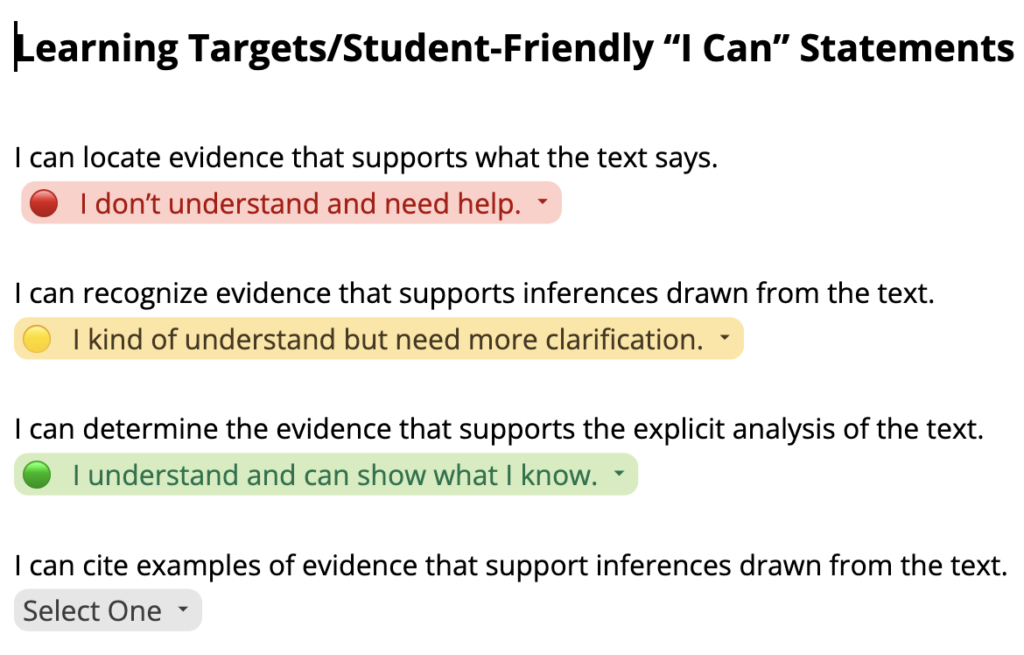
You can assign this to each student in Google Classroom with "Make a Copy for Each Student," and students can use the drop-downs you customize to answer. You can use different colors and symbols to help students quickly reflect on their learning or how well they met the student-friendly objectives for the day. (For more on using drop downs in Docs, check out the linked video!)

You could also use a Google form Exit Ticket with emoji or picture responses for reflection.

 (Click the link above to create a copy of a template with some pre-made options). The advantage is that you get a quick visualization of the data, showing which students did and didn't understand and supporting the development of student groups.

There are so many ideas for using emojis for student thinking and feedback. Let us know in the comments if you are using it!


Friday, September 23, 2022

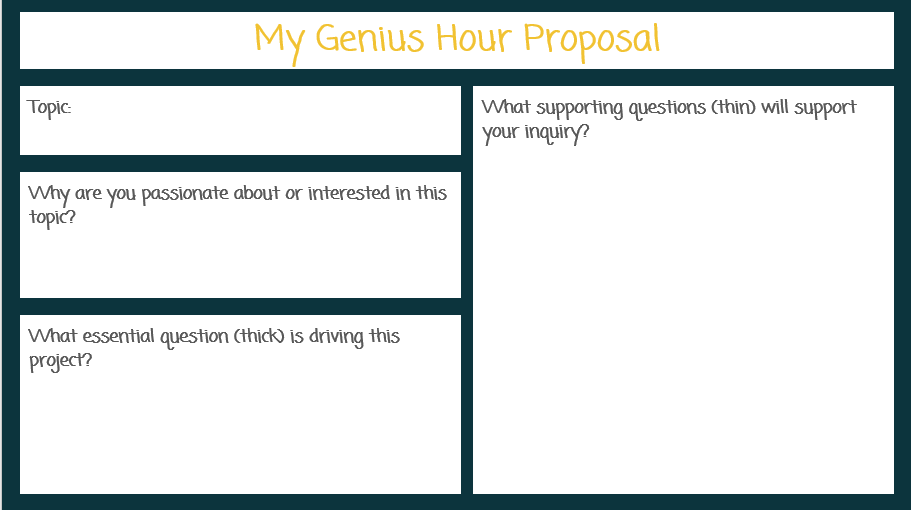
The Genius of Genius Hour

What is Genius Hour?

According to NCTE,

In the Genius Hour model, instructors allocate a portion of class time—often the 20 percent that gives the approach an alternate name (20% Time)—for student exploration of a self-selected and/or given topic. Students turn to an array of sources in the course of their explorations and consider the topic from a wide variety of angles before synthesizing all of their research into a central understanding. This culminates in a final product, project, or other such artifact, that is shared with the class and potentially the larger school community. …

But an hour is a long time...

so, how can we possibly take the genius of genius hour and make it work for us in LESS time to further personalized learning?

By making a little time for inquiry.

This will undoubtedly look at little different at each grade level, with different structures and supports.

How would this work?

In elementary school, inquiry might be a station that students are able to rotate into once a week, or perhaps an option for students during WIN block. Inquiry might be very guided and on a particular topic, as this kindergarten teacher shows, or it might be a little more independent: students can use grade-level resources (reading, video, or simulation) curated on Destiny Discover, which is curated at GES (with resources like PebbleGo!), GMS, and GHS, or teachers might provide source selections on different topics related to class learning.

Documentation of learning can take different forms and be as long or short as the student can provide. Alice Vigors shares the idea to give a Google slides template for students to use to "Blog" about what they are learning; using Mote or Screencastify (which we subscribe to!) could allow students who struggle with writing to record on the slides...or perhaps students create a Flip post that explains in 1-2 minutes what they learned during their inquiry that day. It might even be an annotation of a paper that students take a picture of and share to Google classroom!

Secondary students might also have research as a station or use WEB or SIB time to pursue inquiry! GMS and GHS students can use Noodletools (See your Library Media Specialist to show you this cool tool!) to easily keep track of and share their learning. 

Melissa Kruse, keeper of the Reading and Writing Haven blog, shares 6 Ways to Differentiate Research Paper Lessons that might spark additional ideas for secondary teachers how providing time for research can help teachers reach individuals and small groups at their different places and paces. 

However, this research need not lead to a paper--students might simply present their learningstudents might create TED Talks, or students could create a Google site.

There is so much research behind the benefits of embracing inquiry and so many resources for implementing genius hour--reach out to us if you want to create your own plan!

Friday, September 16, 2022

Templates for Teaching

On a recent Truth for Teachers podcast, Marguerite Redelfs shared how she uses templates to save time AND support deeper student learning. Perhaps this is a no-brainer for some of us, but it can be worth remembering that there are a lot of ready-to-use structures out there to make teaching not just easier to prepare for, but also better for deep student learning.

Brain research supports the use of using and reusing "standardized" approaches to tasks or topics, as the familiarity with the process increases students abilities to focus on the new learning. For example, if we introduce a new review game to students, they spend as much if not more of their mental energy on learning the game as they do accessing the content. Thus, playing Blooket to review at the end of each week or unit allows students to focus on the learning and not the rules of the game.

Likewise, using Google Slides or Google Jamboard templates for Visible Thinking Routines that you can use over and over is not only a huge time-saver for the teacher, but helps students focus more on the product than the process.

Using templates for hyperdocs or other lesson organization structures is just smart. The time YOU save on creating something from scratch can then be spent on other activities that support student learning.


Friday, September 9, 2022

Start with a Vision for your Classroom


There was quite a bit of talk in education circles over the summer about how new advances in VR and in the development of the "metaverse" would impact education. Will this be a way to connect students to people and places they would never otherwise see--or will it be a gimmick?

We'll have to wait to see, but it did get us thinking about the renewed interest in visualization. 

Visualization, imagining things at their very best or mentally (or virtually) rehearsing what you want to see or do before you actually do it, has been proven to have a powerful impact on performanceOlympic athletes use it. Business executives use it. And more and more, educators are using it too.

Visualization is a brain booster, impacting memory, planning, and control. And creating and staying focused on a vision is a great way to meet your goals.

As we start the year, it is worth taking some time to visualize your ideal classroom

  • What are the students feeling? How do you see this in the way the students are behaving?
  • What does the learning look like? What are students doing? Where are they?
  • What will the teacher be doing? What is the lead learner's role?
  • What academic and social/emotional results are evident?
Brainstorm or take note of what you see. Then identify the 3-5 elements of your "vision" that you want to focus on every day as you set your goals. 

When you plan your lesson, you can keep these elements in front of you. When you reflect on class that day, you can think about how it aligned to your vision--and what you might want to shift to make that vision more of a reality.

You could even try making a vision board. Jennifer Gonzalez recently shared how teachers are using vision board to plan units (it's very cool), and this speaks to the power of keeping this "vision" at the metaphorical or literal front of your classroom, as well as the power of involving students in creating the vision.

What is your vision for learning in your classroom this year? 


Tuesday, June 14, 2022

Professional Learning for Sustainable Teaching

Many educators have shared that this summer, they just need a break. And "unplugging" is absolutely one important part of self-care. 

But for others, summer is a time more akin to an athlete's off-season, a time of rest and rejuvenation, but also a time to think and plan ahead.

And if we want our regular school year to be sustainable, having the mental and physical space to make plans for our teaching can be vital.

One inspiring read, for those who want to let their minds wander, is Catlin Tucker's recent blog post "Could Doing Less in Education Give Everyone More?" The takeaway: think about what is on your plate that you can remove. As you think about what you typically do during the year, ask the question: "Do I have to?" and focus only on what is most essential.

A helpful resource for this is the Modern Classrooms Project. This model is all about MASTERY-based, self-paced, blended learning, but we love the approach of thinking of assignments as "Must Do, Should Do, and Aspire to Do." If we focus carefully on those things that we must do, then we can feel good about that baseline, and even better when we exceed it. MCP has a free online course that is FULL of resources, and several GPS teachers are taking advantage of summer scholarships to take the advanced mentorship.

This approach also helps teachers think about how to empower learners more and increase engagement. Teaching students to be more independent and given them the space to do the work allows them to lead their own learning. For more on this, Paul Emerich France has a 5 minute read that will spark your thinking.

Finally, if you are looking to dive into some other, more specific professional learning, whether small or big, check out the GPS Summer PD choice board, modified from one created by Ditch that Textbook.

Whatever learning or reflection you participate in, celebrate the fact that you supported students through this challenging school year. Enjoy your summer!


Friday, May 27, 2022

End of the Year Technology Clean Up

It's hard to believe the school year is drawing to a close, but given that Chromebook collection is fast approaching for students, there are things for teachers and students to have on their collective radars now to ensure a smooth end of the year AND set you up for a smooth start to next year!


1. Prepare to Archive and Otherwise Secure your Google Classrooms 

Your Google drive will be FILLED with student files if you don't return work. If you've been holding on to student work all term (or all year), now is a good time to return those files. This will save your Google drive from clutter and help you find things faster in the future.

  • This Teaching Channel blog post walks you through the process and includes a helpful video tutorial!
  • One additional tip, for those of you worried about securing assignments for academic integrity reasons, you may also opt to unenroll students from classes. This blog post will explain and walk you through the process.

2. Support Students in Organizing their Google Drive

Once you return work to students, you could give students the opportunity to create a portfolio for their families OR students could organize their work into folders for school applications, Vision of the Graduate reflections, or any number of other reasons.

3. Organize Your Files without Creating Additional Clutter!

  • Use versioning to name this year's file without making copies that clutter your drive.
Instead of making copies, go into the Version History and name the current version. This way, you can have multiple versions of a test, assignment, handout, etc. that is customized based on your group of students, semester, etc. And the great part? You can go back and forth between named versions without losing any of the versions!

  • Place shared files in a shared drive--your team or department will thank you!

Tuesday, May 10, 2022

PBJ is PBL?

My daughter is obsessive and picky about her peanut butter and jelly sandwiches. As I was putting just the right amount of peanut butter on her lunch, listening to a podcast, and thinking about project-based learning (PBL), it occurred to me that with this sandwich, I might just have a project on my hands.

You see, many teachers of writing have done some version of the peanut butter & jelly sandwich writing activity. (I used to do a version called "How to Eat an Oreo.") The gist is to model how "bad instructions" can lead to confusion (i.e. smearing jelly on a nose, instead of on bread), while clear and specific instructions lead to perfection.

While this is certainly a fun activity, most educators would say it doesn't rise to the level of project-based learning (PBL). We often hear that PBL has to have certain steps or rules, like an authentic audience and outside experts, and making a PBJ just doesn't cut it.

But who gets to say that isn't PBL?

PBL Works shares that:

Project Based Learning (PBL) is a teaching method in which students learn by actively engaging in real-world and personally meaningful projects.

About 15 minutes into a recent podcast, PBL expert Trevor Muir shares that his own first grade son's experience crafting his dream house as part of class showed him that PBL is flexible, as "real-world authenticity" can vary a lot based on the students in the classroom. 

For example, if your child is very, very picky about how her PBJ is made--lots of jelly, cut into squares, arranged in a circle on the plate, etc.--then that child will have a greater sense of ownership than a student who is allergic to peanut butter or who doesn't eat bread. Likewise, students interested in food science might want to investigate what it is about the PBJ that makes it such a popular combination of flavors, or experiment to see if other PBJ applications are as popular.

The key is helping to make the learning address or solve a problem or questions that is meaningful and relevant to YOUR students. Often times we have elements of this in our classrooms already, and framing our planned activities with a question or giving students opportunities to own a topic can make the difference. The GHS Biology team made a similar shift two years ago, taking a project they would normally do at the end of the unit and making it the driving purpose of a unit: as students explored their species, the lessons the teachers taught about evolution were made all the more relevant.

There is so much research behind the power of PBL that it is worth the try. Feeling like you have to be "perfect" before trying it or that students can't handle it ought not to stand in the way. Students can learn just as much, if not more, from a failed experiment as an epic project, and as a teacher, you get to model the same humility and growth mindset that you want to foster.

Think that your unit would be more interesting if centered around addressing a  real-world problem or question? Check out these resources for more ideas on how to start using PBL to make your classroom more responsive to student voice and choice.

Thursday, May 5, 2022

Getting Organized with Google

 Teachers end of the year to-do lists can feel long, and while cleaning up is cathartic and important, it often feels overwhelming.

Thankfully, Google has added some tools that can make your digital clean-up easier.

Two tips teachers have shared as being game-changers involve Google Drive and documents.

1. Use advanced search to quickly find (and then organize) files.

The quick tip video from Google teacher guru Kasey Bell quickly shows how to use the Google search chips to quickly find that file you are looking for, even if you never put them into folders.

This is also a great way to find files "Shared with Me" that you need to add to your drive and organize into folders for easy use in the classroom. For more on this, check out the TLI Educational Technology page.

2. Use named versions to eliminate document overload.

Teacher Tech master Alice Keehler shares that naming versions of documents using version history is a great end-of-year clean-up strategy and a great habit to use all year long!

Many teachers "Make a Copy" of a document when they update it for 2021 or 2022, thinking they may someday want to revert back to the version from 2019. However, this leads to many nearly redundant files in your Drive...and confusion when trying to find "the right" version of the document!

Instead, when you go to update a document for the new year (or close out this year), go to "File," select "Version History" and name your version. This could be with the year, or even a longer descriptive title that indicates the changes made. 

Then, if you make changes and in a couple months or years want to revert back, you can simply "Restore" the desired version. 

This also helps with those users of hyperdocs, as the links in your document won't change. Additionally, Google Classroom teachers who want to "Reuse" assignments from year-to-year can avoid having to change up attachments, making the process even easier.


Wednesday, May 4, 2022

Fast Food Feedback: Make it Worth It!


Fast food is great because it is (usually) fast: as a consumer, you don't need to cook, wash dishes, or sometimes even get out of your car. However, if you just scarf down the food without tasting it, then you've wasted the experience.

Fast formative assessment is a little like that: if we don't take the time to "savor" that feedback, then  the effort of collecting the data was not worth it.

Most of our students are used to these faster computer-based assessments, whether in the Illustrative Math platform, on a Kahoot, or a teacher-made Google form. The benefit of having computer-based testing should be the ease of feedback: in mere moments, something that would have taken at least a half hour to mark has been scored and can be accessible to students for feedback, at least in terms of knowing what they got right and wrong.

So, how do we make students do more with that feedback than just look at the score?

Solution 1: Teacher-Made Groups
Look at the data and make some strategic decisions: are there questions that most students got wrong that warrant a whole class reteaching? Are there students in the class who got a commonly missed question right and could act as "experts" to help during a station rotation review activity? Are there groups of students who would benefit from small group re-teaching on a topic?

Solution 2: Student-Led Groups
Shift the responsibility to the students: Might you build in time for students to identify the top questions to review as a class? Might they work together to write explanations for the top (2, 3, 5?) questions they got wrong, but upon reviewing with peers, etc., they now know how to answer correctly? Might they have to share how they would do better on a similar question in the future, or write their own version of the question to show they understand?

What other solutions do you have for making students more responsible for using fast feedback?

Tuesday, April 12, 2022

Take Time to Save Time: Learning Targets

Let's begin with a confession: we didn't always care about learning targets. When they were first all the rage, we thought that surely, students didn't care about our learning targets...

Except, that once we started crafting them in student-friendly language, and once we started using them intentionally to plan and communicate the lesson intention to students, the students did care. And we realized we did too.

Students stopped asking "Why do we have to do this?"; closure activities and formative assessment became easier; and work that we didn't realize was more "busy" than valuable began to work itself out of the lessons, leaving more time for high-quality learning experiences. And less time spent planning.

The research is clear: "learning targets" are important to share with students. In the Edutopia article "How to Make Learning Targets Clear to Students," Dr. Michael McDowell shares:

"When students are clear on expectations of learning, they tend to double their rate of learning. Moreover, when students are clear on expectations, they have a better chance of assessing their current performance and using feedback accurately."

The challenge is that just because we write a target on the board, it doesn't mean the expectations are clear to students. So, how do we make our learning targets useful for teachers and students?

1) Plan student-friendly learning targets for the lesson.

The more direct and accessible we make our goal statements, the clearer we are about the intended learning. This can be tricky if we have other underlying goals for our work (i.e. students will practice collaborating, critical thinking, perseverance, etc.). While these are worthy practices, sharing too many goals for the day can be confusing when planning--and when presenting the goals to students.

As you work on this skill, it may help to brainstorm all the goals you can think of for the lesson, and then refer back to the standard(s) of focus for the learning experience when picking the main one or two targets to share with students. 

Make sure that you draft and share the goal in terms that students can (or could, with support) understand. Often when we break things down into terms a child could understand, we understand more fully ourselves!

2) Align your planned activities and assessments with the target.

If you think about the "assessment" you will give to gauge student progress during the lesson, does it align with your learning target? Does it show if students know and/or can do what you want them to? If not, you may need to revisit the target OR the assessment. 


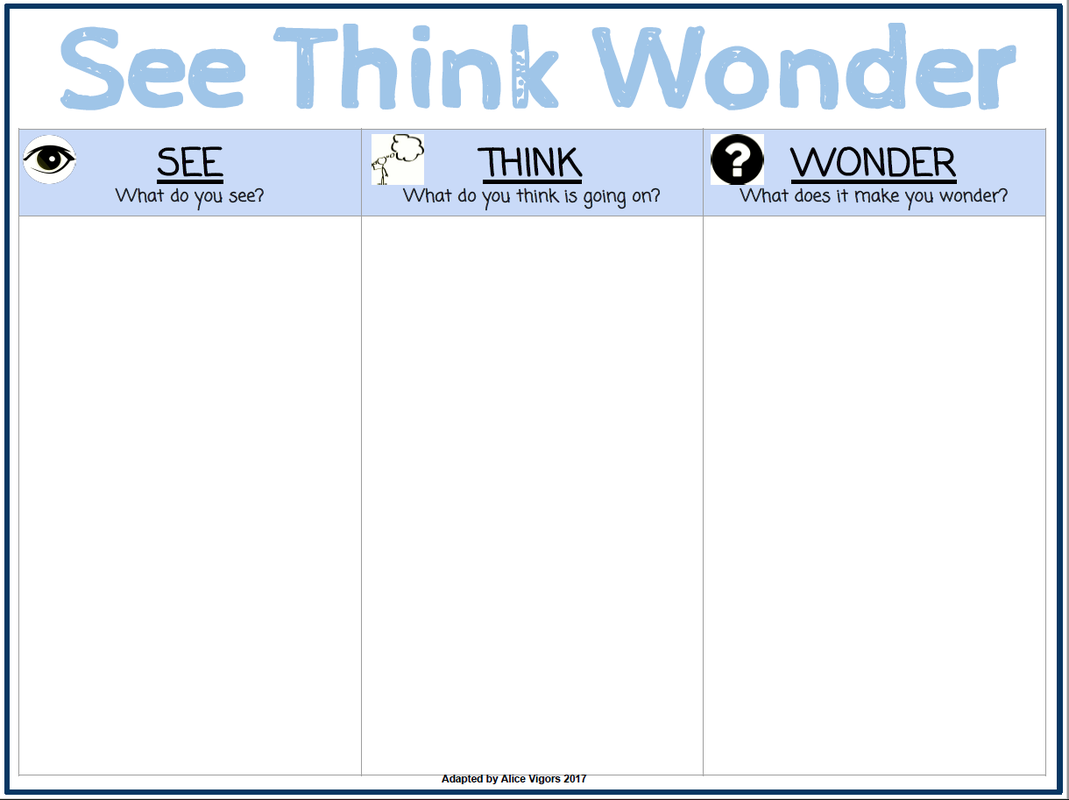
Likewise, before you plan activities, think: do they support students in reaching the learning target? If not, think about how you might replace them with opportunities for students to collaborate, practice, reflect, or revise their thinking to better meet that goal. This can be done with thinking routines like 3-2-1, see-think-wonder, or word-phrase-sentence, which can be used over and over again, or other low-prep practices like brain dumps, summarizing  learning, or making connections in a write-pair-share-revise.

3) Provide time in the lesson for students to make sense of the targets.

Rushing often leads to reteaching! Taking a few minutes at the start of class to have students paraphrase the goals OR make a plan to meet them might save time in the long run. Teachers can check for misunderstandings before students get too far into the process, and students can see where their understandings are incomplete and ask questions before they start. 

Taking a few minutes to reflect on progress at the end of class with a simple "Fist to Five" or an exit ticket reflecting on the goal is easier with a clear target too!

Learning targets = happy classrooms.

By focusing carefully on your goal for the lesson and clearly communicating that goal to students, you save time on planning and on student confusion, leading to less stress and more learning.

For more on how to create learning targets, check out EL's resources.
Saturday, April 9, 2022

Review at the Loo


In the past few years, many people have been promoting "Potty PD," or quick items for professional learning that can be shared in places where teachers have to wait (i.e. outside the bathroom or next to the copy machine). 

A teacher at Thursday's LEARN book club for The Six Shifts (about the practicalities of implementing instruction based in the science of reading) shared a similar idea, but for students.

Essentially, she shared that teachers use the time waiting outside the bathroom for classmates to have their turn as a time to play review games for phonics, math facts, etc. She shared that this improved student behavior and made this time academically enriching.

For more about resources from The Six Shifts and related to the Science of Reading, check out TLI's Curriculum Development Website.

To join the LEARN book club (reading the book is not required!), contact TLI.

Thursday, March 31, 2022

Maximize your ClassroomScreen

 You planned your lesson for students to work in groups. To do this, you need to sort students, set a timer, and keep students apprised of how their behavior is meeting with expectations.

ClassroomScreen can help you efficiently prepare for this work. 

It's easy to get started. You don't even have to create an account, though you can create a free account and login with Google to save your favorite name list (for easy grouping) and widget preferences.

Show the widgets you use most on any display screen. The app provides useful tools like timers, drawing tools, the random-name picker, and a favorite, the noise-level monitor. You can also embed media, like the videos for your favorite brain breaks. 

Access this anywhere. If your class goes to the library or a lab, this screen can pulled up quickly from any screen with an internet connection. 

There are so many uses for this tool!

If you haven't looked at this before, it's worth giving the free version a try. Let TLI know what you think of the tool, or if we can add any materials to our Educational Technology website to clarify how best to use it.


Thursday, March 17, 2022

Start With What You're Proud Of

Who doesn't love attention for what they are doing well? When we build from our strengths, we build on a strong foundation.
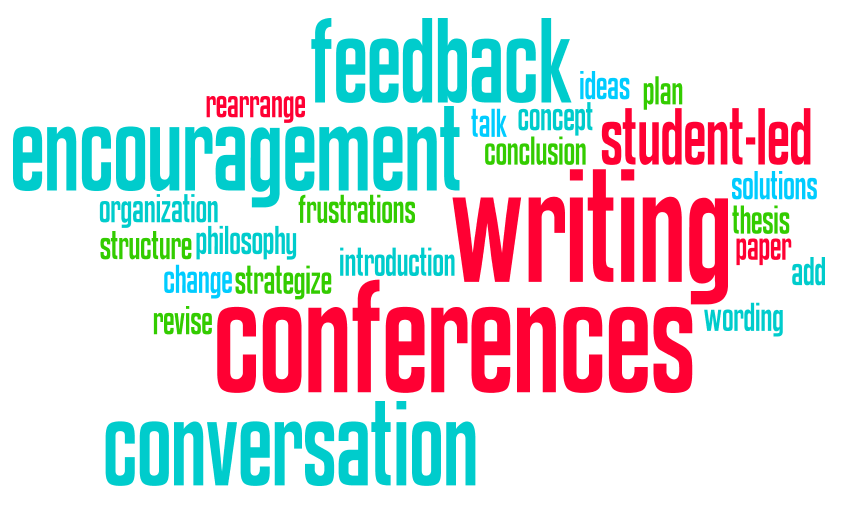
This came up as teachers on the district catalyst team recently discussed student-led writing conferences. If you are a teacher who has students write (and hopefully revise), this technique is worth a look.

Some of the Benefits:

  1. Saves time
  2. More effective feedback
  3. More effective instruction

Instead of writing a bunch of comments that students may or may not read on their writing, the teacher has the STUDENTS identify what they want to focus on. This takes a few minutes of reflection for students, but saves the teacher HOURS of close reading student work. Plus, research shows that students often need support acting on written comments or they ignore them (often because they aren't timely or sufficiently helpful). 

The conferencing technique calls for teachers, instead of writing all over the student work, to devote five minutes to each student in class. During that 5 minute conference, the teacher and student review the parts of the assignment that the student identifies as wanting feedback on. Feedback works best when we also collect it from students (see Hattie, J (2009). Visible Learning: A synthesis of over 800 meta-analyses relating to achievement. New York: Routledge). The student sets the goal based on the learning target(s), making it all the more meaningful to them, and then has time to act on that feedback.

For more on how this works, you might consult Edutopia's 5 minute conferences resource and the sample comments/questions from Literacy Today.

But the addition that made this MOST effective in practice was not just asking students what they wanted to discuss for improvement, but to start by asking students to share what they were most proud of.

This had several benefits.

1. It alerted the teacher to sensitive topics. If a student was really proud about a paragraph they wrote that the teacher would have covered in real or digital red ink, then the teacher might approach feedback differently. It's hard to focus on the good when your pride and joy just got trashed.

2. It gives a snapshot of the student's level of understanding. If students are accurately identifying the good in their work, that can be valuable even for students who already don't have a lot to work on. Likewise, if a student identifies something good that isn't really great, the teacher then has a door open to addressing the misconception.

3. It gives a starting point for students who THINK they have nothing to work on. One question that was asked is what to do if students come to the conference and think everything is great. (Or they want to avoid the conference, so they claim it is great.) Asking someone what they are proud of is a non-threatening question that opens the door to adding more...rather than saying a student needs to "fix this" or throw things out. Many students will be open to feedback when the discussion starts with what is good.

And this makes sense, when we link this to what we know about behavior-specific praise being more powerful than corrective feedback in terms of changing behaviors. Who doesn't want to keep doing what earns them accolades?

If you want to know more about how student-led conferencing can work for you or for assignments other than writing, contact TLI, and we'd be happy to provide you with resources or help you co-plan this activity for your students.

Wednesday, March 9, 2022

Put a Hex on Them!

A recent GMS lesson reminded us of how powerful, flexible, and relatively low-prep hexagonal thinking is as a tool/strategy for teaching and learning.

What is Hexagonal Thinking?

Maybe you caught the Cult of Pedagogy post on Hexagonal Thinking last year and thought, that looks cool, but I'm not in a place to cut out a bunch of paper hexagons right now. Or maybe you haven't had time to read through the variations and ideas, and now that you have seen people using this tool, you are wondering how to make it work for you. (If you want to see how hexagonal thinking works in detail, this post is so good!)

Why would I use Hexagonal Thinking?

If you haven't tried it, there are so many research-based reasons to think about using hexagonal thinking as an activity for review, formative assessment, or even summative assessment in your classroom.

  1. It uses manipulatives (physical or digital)
  2. It encourages academic conversation and collaboration
  3. It elicits higher order thinking
  4. It calls for identifying similarities and differences
  5. It is highly visual and encourages students to "build" a graphic organizer
  6. It supports long-term learning

Examples and Templates

The Cult of Pedagogy post links to many resources for physical and digital templates and examples. There are tutorials for creating digital versions of hexagonal thinking, but if you really want to save time, try starting with this Google Slides template/history example. If you are looking for more in your content area or grade level, you might check out some more examples:

There are so many ways to use and adapt this activity. Let us know how hexagonal thinking goes with your students!


Friday, March 4, 2022

Put It on My Tab

Quick Tip: You've probably noticed that your Google docs (and other tools) have started suggesting the next few words to write. This "predictive text," like the suggestions on your phone, is a great time saver, but not everyone knows how to active it.


Here's how it works:

When you see the predictive text pop up (usually in a gray color), hit the "Tab" key. The text will fill in! If you don't want all of that text, you can backspace or just continue typing and the suggestion will go away.

If you want to turn it OFF (or turn it back on) in Google Docs, go to Tools in the menu bar, then select Preferences, and find Show Smart Compose Suggestions and unclick the check box! That’s all!

To see how this works, check out the video below, which also shows how you (or students) can use Speech-to-Text.

Side Tip: Predictive Text in the Google Search Bar

You might also note that suggestions pop up in the omnibar (the place where you put the URL). This is great for pulling up recent documents, etc. without going to your Google drive! 

However, if you want to turn this off, follow the directions from this Google Expert:

Please refer to this if you want to turn off predictive text.
  1. Go to the Chrome menu on the browser toolbar.
  2. Click Settings.
  3. Click Show advanced settings (on the bottom)
  4. In the Privacy section, deselect the "Use a prediction service to help complete searches and URLs typed in the address bar" checkbox
Have other features you want to turn on/off? Use the comments below or email TLI!

Thursday, March 3, 2022

Create a Progress Report from Google Classroom

Google Classroom is amazing for so many reasons, but if you want to give parents (or SST) a progress report of Google Classroom assignments, which may include tasks that aren't reflected in the gradebook because you are looking at completion, you need a workaround.

This blog post shows you how to download a sheet from your Google Classroom gradebook.


Now, to make a simple single student progress report, you can do the following:

  1. Create a new filter view.
  2. Select only the student/data you want.
  3. Print! (Print to PDF to attach to an email)
Our video tutorial shows how, plus how you might use this to share notes about student progress.


Let TLI know if we can help, and happy conferencing!

(PS: If you are curious about other tools that work with Google Classroom, check out this demo from Schoolytics. It isn't currently an approved tool at GPS, but if you want to see more about what it can do, contact TLI.)