Featured Post

Avoid Quarter 2 Blues: Save Time with a new Google Classroom

For those of you ending the quarter, now is the time to create a new Google Classroom for each of your classes. Organizing new classes will...

Showing posts with label Blended Learning. Show all posts

Saturday, May 11, 2024

Station Rotation: Tips and Tricks to Address Common Questions and Concerns

Many teachers in our school district use station rotation with great success in terms of academic achievement, student engagement, and student self-regulation. However, even the most accomplished teachers encounter complications with station rotation or have misconceptions about the way it "has to" be.

Every Station, Every Day

Some teachers adopt wonderful models like READ or MATH, which involve students completing the same stations within a class period (i.e. manipulative station, application station, technology station, etc.) However, many teachers also feel pressed for time or pressured to see every student group every day. In a recent blog post, blended learning expert Catlin Tucker shared: 

A teacher recently asked me whether students always need to attend every station in a rotation. The short answer is “no.” 

As many practitioners know and practice, station rotations can be spread out over the course of a week, but Dr. Tucker's answer goes beyond this to clarify that station rotations can be designed to allow for students to omit stations or even select stations based on preference. 

By contrast, the must-do versus may-do variation of a station rotation requires that teachers use data to identify student needs and design a rotation in which specific students are required to attend one or two “must-do” stations. In addition to these “must-do” stations, students can select a certain number of “may-do” stations to spend time at based on their preferences and interests.
In this way, students who are ready to move ahead or may be ready for an extension can do so, while students who need more time with the teacher might be assigned to more than one station involving the "teacher table." This can work best with a document to help facilitate a virtual station rotation, allowing students to select from a menu of activities at their 3rd or 4th station. This can involve individual student contracts or playlists...which leads to another tip!

Noise

One concern many teachers have is that a station rotation will be noisy and chaotic, especially if the teacher is scheduled to be at a teacher table. However, a teacher does not HAVE to be at a teacher table at all! A teacher can plan to circulate, especially if direct instruction is delivered in the form of a video. In this station rotation model, the stations can vary based on where in the unit the class is, and the decisions about which stations the teacher will be at are flexible as well, with the teacher at the station for feedback or reteaching depending on the task and the needs of each group of students. 

Dr. Tucker also suggests that in addition to explicitly teaching the expectations for each station (i.e. looks like, sounds like), that teachers have anchor charts or other visual aids to reinforce expectations. For example, many teachers who project their computer screen (since the computer has a microphone) are able to use this noise monitor feature of ClassroomScreen, as well as visuals projected on the screen, to cue students to expectations.

Preparing for station rotations can take a little time up front; it's best practice to start small and really devote time to model expectations, and once students are clear about the expectations, this model can actual DECREASE the chaos and noise. Predictability is powerful!

Accountability

Especially as the year draws to a close, teachers worry about students being off-task at stations, especially if there isn't a "product" that needs to be produced at the end. While talking chips can be helpful at discussion stations and embedded questions (as with Screencastify or Edpuzzle) can help with accountability during instructional videos, sometimes students need more.

This is where checklists can be helpful. As the following video shows, pairing with the checklist (kind of like a playlist, but used for accountability) is almost like giving students a passport from station to station. In order to pass to the next station, students need to complete the reflection, question, or other quick task on the checklist.
At the end of the class, students turn in their checklists as a sort of ticket out of the room, and they get the tangible benefit of seeing all of their tasks checked off!

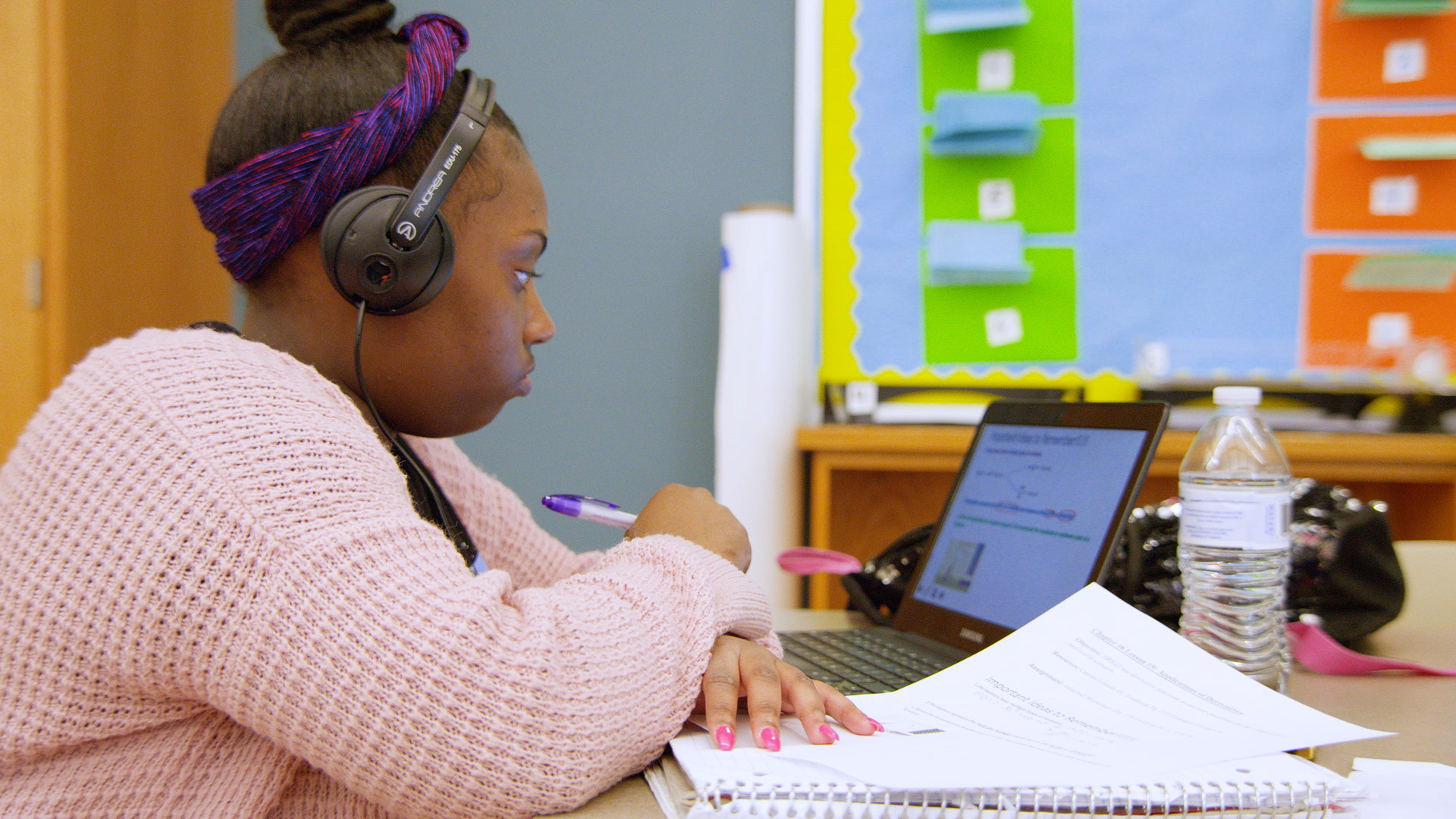
While station rotation can seem like a lot to pull off, by devoting time to planning and setting up structures, this model can help teachers create the responsive and smooth classroom that we all dream of!

Thursday, October 5, 2023

Tuning Out, and Tuning In: Video Instruction May Be More Effective


A recent article by Erik Ofgang of Tech & Learning shares an analysis of more than 105 studies comparing the effects of live, pre-recorded, and combination instruction.

Interestingly, the research suggests that students learn better from videos, and best from a combination of video and in-person instruction.

Dr. Michael Noetel, lead author of this research and professor of psychology at The University of Queensland, says, "Sure, we want to make classes interactive and engaging, but when we need to explain a concept in the first place, then videos are some of the best ways of doing that."

Why?

Dr. Noetel says, “Probably because we cut out all of the rubbish and we edit ourselves to be more concise. We lose all of the irrelevant stories, and students can skip the parts of our lectures that they think are boring. That was really surprising, and a little bit of a hit to the old ego to find out that they prefer to be able to skip parts of my lecture rather than have to sit through my stories.” 

In other words, class time can be saved because the teaching gets right to the point.

This connects with the idea of the microlecture. By focusing on one particular concept or skill for only 6 minutes or less, a teacher creates powerful instructional video. This allows learners to slow down or catch up if needed, and frees up the instructor to work more with individual students and structure class time to maximize "interactive, higher-order activities where they can benefit from the support of others" including peers.

Instructional videos that combine audio and visual cues, packaged in easily digestible segments, also aligns to research about how students of all ages learn best.

Other uses for video instruction include, well, giving instructions! By recording instructions for stations or bigger assignments that students can pause, rewind, and return to, the teacher is able to reach more learners directly, by being freed up, and indirectly, by giving learners the power to customize their pace.

How might you use videos to more effectively meet the varied needs of your learners?

For more on making effective instructional videos and incorporating them wisely into class, check out these research-supported steps from Modern Classrooms Project founders and these 9 instructional video techniques that drive engagement from Screencastify.

Friday, April 28, 2023

Do you like free stuff? Scholarships and Edtech Updates.

Free Stuff!

First, because the deadline is April 30, have you thought about professional learning this summer? The Modern Classrooms Project has a limited number of scholarships (a $750 value!) available for their Virtual Summer Institute, which provides self-paced learning and networking opportunities for five weeks, along with individualized coaching from Expert Mentors who use the model. If you want to learn more about using blended learning to increase student mastery and make teaching more enjoyable and sustainable, check out this AMAZING opportunity! 

Special scholarships are also available for special educators!

EdTech Updates

Canva now has Magic Write and Magic Design. 
These AI tools are a great way for teachers to start documents and presentations fast...but it is also a tool students might be using, so teachers need to be aware. Here's a walk-through of how Magic Write works:


If you haven't tried Canva, educators and students can use it for free! It has expanded to include so many capabilities for document design, visuals, and video editing that it is worth checking out. Let members of TLI know if you would be interested in professional learning on this.


Flip now has a Reading Coach in Immersive Reader!
Looking for kids to get feedback on their oral reading? Then this might a tool for you. Check out how it works in this video:

And, even if you just want to have a tool to read text aloud to students or support student reading, consider using Flip and the Immersive Reader to support student learning.

Do you use Newsela? The paywall is rising...

Beginning this summer, users with free Newsela accounts will only have access to a handful of current event articles each month, selected by the Newsela team. One article will be released a week, and articles will disappear after four weeks. The company shares that "Our full catalog of 8,000+ leveled news and current events articles will only be available in our premium products."


Friday, April 21, 2023

Differentiation with Station Rotation

In the past few weeks, we've seen some awesome station rotation lessons at GMS and GHS.

In one GMS special educator's classroom, students were able to experience a variety of tasks and work in a variety of ways on math problems. At one station, students played a competitive game with dice and a game board. At another station, students completed individualized practice on the computer. And at another station, students worked collaboratively. The teacher was able to casually circulate, providing support and feedback to individuals, as needed.

One GHS social studies teacher used the station rotation to break apart and scaffold a complex document-based response activity. Instead of giving students a huge packet of resources, students rotated to different pieces of evidence around the room and used guiding questions to support their comprehension and analysis of these documents. The teacher was able to target support to each group based on their document, and an early finisher station allowed some students to move ahead at their own pace. By tackling the task piece by piece and in collaboration with peers, the students were more engaged with the topic and more eager to write a response.

A GHS special educator used station rotation to have the opportunity to pull students in small groups for targeted instruction according to a timed rotation, with other students working on independent tasks at other stations. The rotations allowed her to provide differentiated content and processes for students based on their needs and abilities. The teacher was able to provide real-time, high-quality feedback to students as they worked, allowing them to be partners in the learning process and ensure that their practice was perfect.

Perhaps most interestingly, the teachers shared that not only were they more relaxed in the pace of the station rotation, but the students happier and more on task. Several of them used technology, like video or slides tutorials, to free themselves from needing to explain things to the class, and others used ready-made online practice to support personalization of practice.

These teachers showcased how station rotation can be used for a myriad of tasks and in support of differentiation. There are so many ways to use station rotation to make life better for teachers and students. If you want more ideas or answers to frequently asked questions, check out this blog post from Catlin Tucker or talk to a member of TLI.


Friday, February 24, 2023

Innovation and Imperfection: Embracing B+ Work and Beta

Risk-taking is part of innovation.

But failure is scary, and frankly, people don't learn well from failure. Who really sees an "F" on something and then thinks, "gosh, I just need to grow more"? 

Plus, teachers don't want to fail when the well-being of learners is at stake.

But innovation doesn't happen without risk.

So how do we, as teachers, find the balance between soul-crushing perfectionist behavior and failure?

Recently, GPS educators from around the district met and talked about how scary it was to take risks and try something new, but also how powerful those risks were in terms of their growth as professionals. Blended learning techniques like playlists, incorporating new stations like VR, or using new tools all took time to plan--time that they were afraid might be wasted. Part of what made it work, they said, was planning--often with other teachers, for both time-saved and moral support--and being comfortable with embracing something that was less than perfect, knowing that they would learn what worked.

This aligns with what educators call the power of "teaching in Beta" and settling for B+ work. You cannot get a 100 on every task--who among us has never cooked a not-so-great meal or missed a spot when cleaning? Dr. Angela Watson reminds us that "perfect is the enemy of done":
If we make a task into something that’s hard work — something that feels like it’s going to be outstanding — that often makes the task feel overwhelming. It becomes something we build up in our heads: B+ work is not going to be good enough; a little effort will not suffice. This must be amazing! It must be mind-blowing! It must be as close to perfect as I can get it!
When we think this way about a task, working on it becomes very daunting. We raise the stakes and start to feel overwhelmed. Then we procrastinate, or fail at it and don’t meet our own expectations.
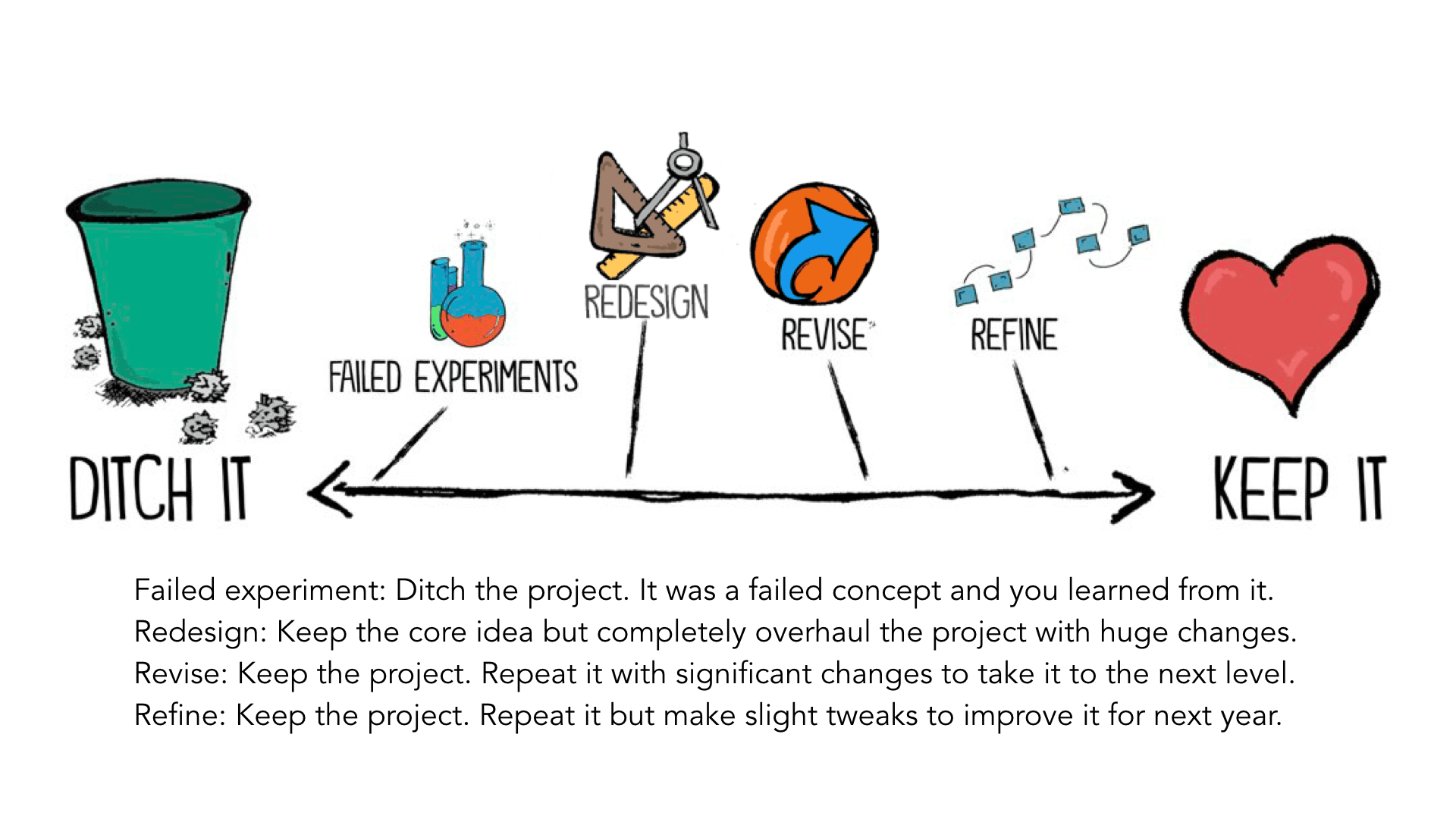
PBL expert professor John Spencer agrees that expecting things to go perfectly is the enemy of innovation, which requires iterations to grow. He advocates embracing the idea of viewing new lessons, projects, and teaching practices as being in "beta" form, like a new piece of software:
It’s the idea that you release your work in beta, knowing that it’s not perfect and perhaps it’s not even very good at all. However, you’re going to send it to an audience so that they can see it, experience it, and play around with it to let you know what you should do to improve it. This feedback leads to self-reflection, where you ultimately change your design and then release a new version. As you move through multiple iterations, you eventually reach a place where your work is pretty good. Eventually, it’s great. But you never stop creating those iterations. You always experiment.
With this in mind, we urge you to give yourself permission to aim for a B+. It doesn't have to be perfect, and it will require reflection, but it's the only way to grow. 


Friday, November 4, 2022

Jamming with Jamboard

If you haven't had much experience with Jamboard, it is basically an online whiteboard that is part of the Google suite. It works well on your Smartboard, Chromebooks, and other devices, and you can learn more about it here.

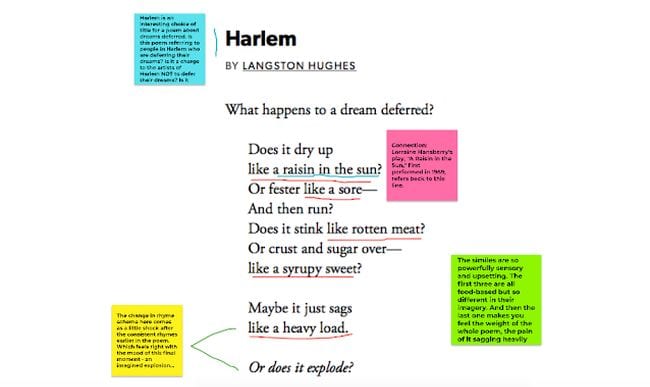
If you use Slides for many things, as I know many teachers do, then it would be logical to wonder why Jamboard would be worth learning and integrating. One compelling reason is the drawing functionality. Unlike slides, the drawing tools on Jamboard allow for easy annotation:

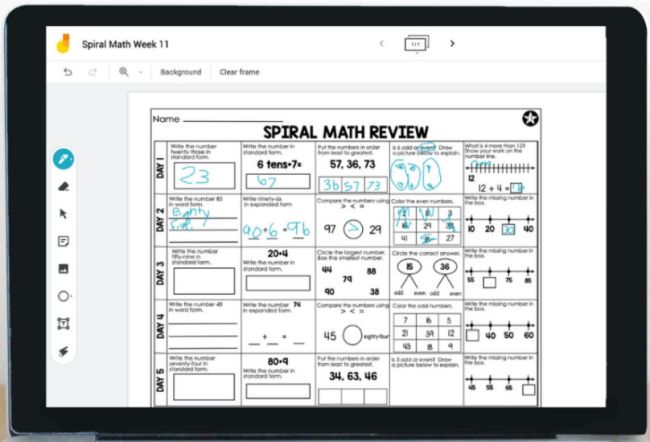
While this many not be compelling without a touch screen, if you have a Smartpanel, this allows you to take notes on a worksheet or picture without much more effort than pasting a screenshot or scan on the board:


Jamboard also allows you to keep adding new screens to a Jam, so if you wanted or needed to save and upload all the notes from class to Google Classroom, this process becomes a snap.

While many teachers don't recommend having the whole class on one Jamboard at the same time (no version history = less accountability), it is great for small group collaboration or organizing quick teacher-directed whole group activities.

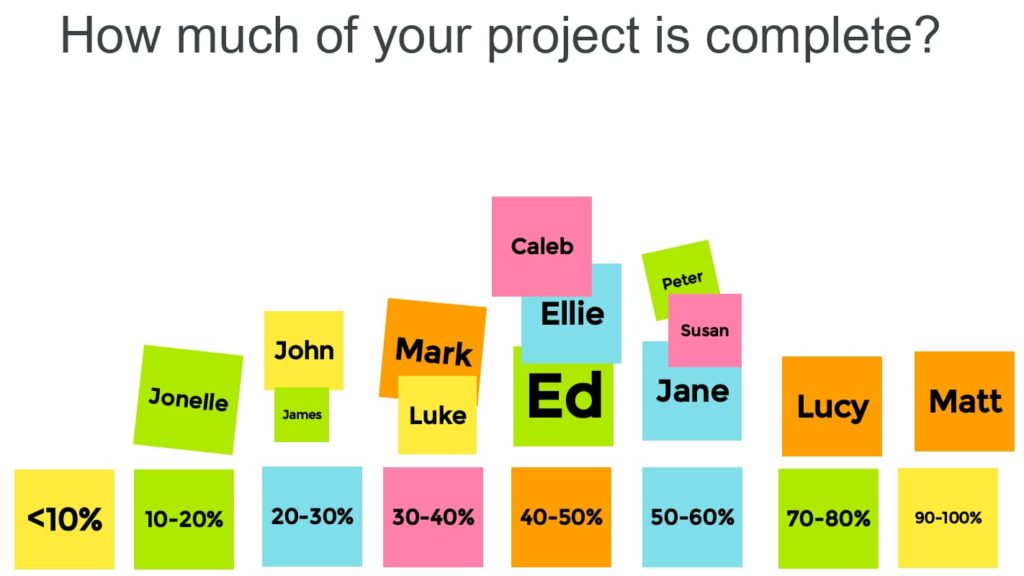
The sticky note function makes it easy for students to quickly contribute and organize ideas. This idea from Chromebook Classroom is so simple, yet it is useful for teachers as formative assessment data:


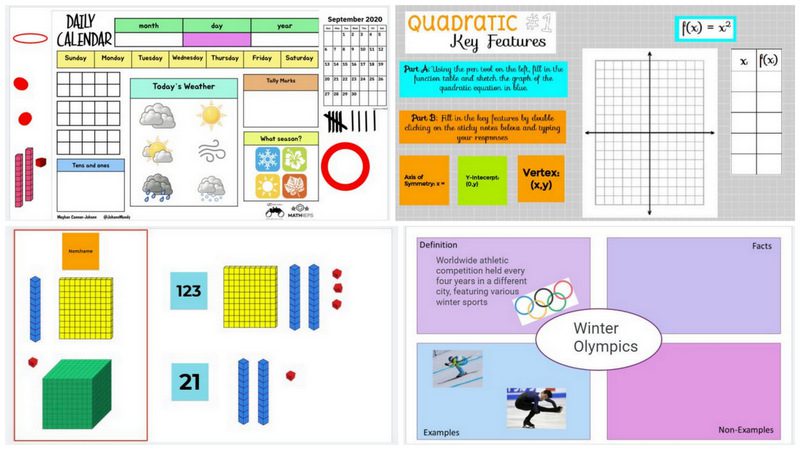
Jamboard makes it easy to manipulate objects on a screen, and if you check out this post from We Are Teachers and this post from Ditch That Textbook, you will find over 40 ready-made templates and ideas that will increase collaboration, manipulation, and accessibility. Why reinvent the wheel when someone has shared a Freyer model template or already made number cubes and calendar items?

If you are looking for something new, or you are just looking to save some time, check out the Jamboard templates that people are sharing.

If you want more ideas, you can also check out this free ebook from DitchThatTextbook with 10 Jamboard lesson ideas and templates.

Tuesday, June 14, 2022

Professional Learning for Sustainable Teaching

Many educators have shared that this summer, they just need a break. And "unplugging" is absolutely one important part of self-care. 

But for others, summer is a time more akin to an athlete's off-season, a time of rest and rejuvenation, but also a time to think and plan ahead.

And if we want our regular school year to be sustainable, having the mental and physical space to make plans for our teaching can be vital.

One inspiring read, for those who want to let their minds wander, is Catlin Tucker's recent blog post "Could Doing Less in Education Give Everyone More?" The takeaway: think about what is on your plate that you can remove. As you think about what you typically do during the year, ask the question: "Do I have to?" and focus only on what is most essential.

A helpful resource for this is the Modern Classrooms Project. This model is all about MASTERY-based, self-paced, blended learning, but we love the approach of thinking of assignments as "Must Do, Should Do, and Aspire to Do." If we focus carefully on those things that we must do, then we can feel good about that baseline, and even better when we exceed it. MCP has a free online course that is FULL of resources, and several GPS teachers are taking advantage of summer scholarships to take the advanced mentorship.

This approach also helps teachers think about how to empower learners more and increase engagement. Teaching students to be more independent and given them the space to do the work allows them to lead their own learning. For more on this, Paul Emerich France has a 5 minute read that will spark your thinking.

Finally, if you are looking to dive into some other, more specific professional learning, whether small or big, check out the GPS Summer PD choice board, modified from one created by Ditch that Textbook.

Whatever learning or reflection you participate in, celebrate the fact that you supported students through this challenging school year. Enjoy your summer!


Tuesday, December 14, 2021

Future math teachers take on videos

Why does so much of blended learning rely of videos? There are many great reasons to use video (see this TLI blog post for more of the research), but I wanted to share a few powerful reasons that future math teachers shared:

1. In essence, as Phil Michener, GHS intern and future math teacher, shared, the video is not replacing the teacher, but rather, multiplying the impact of the teacher, allowing him to be in multiple places at once. Although it seems counter-intuitive, the time spent preparing direct instruction in advance (or during class, if you have a student or a tripod-mounted camera recording you) frees the teacher from the front of the classroom and provides time to meet with students and personalize to meet their needs more efficiently. 

2. Likewise, videos save time if students miss something. Here's an example that SHU teacher candidate Katherine Clyde wanted to share:  Katie didn't think much of videos as a student; to her, they were something left for a substitute to show and unproductive. However:

"Last year, I was working one on one with a student while the teacher was going over exponents. She said any number to the exponent of 0 was always one, and then moved on to the next subject. My student got really upset because he did not understand why this was true and therefore struggled with grasping the concept and so the topic. I went to the internet and looked to see if I could find a better way to describe it and found a really great Khan Academy video on how that math worked. I showed it to my student and he immediately connected with it. He went from not even trying because he couldn’t grasp it, to totally on top of it because the video helped so much. The video was only about three minutes long and it made a big difference in this student’s learning."

Videos meet the needs of many learners, and not just students who regularly need a slower pace. In fact, videos can allow students who are ready to move faster to go ahead, rather than disengage waiting for other members of the class. Additionally, learners who might need or enjoy extra challenge can be given the opportunity to make their own instructional videos, not only providing teachers with more evidence of learning, but potentially providing more support for their peers.

Thinking about using a video to give you more time to connect with students or give students more control over the pace of their learning? Check out these tips (credit to Edutopia for many!):

  • Be selective and clear on your purpose—that will help you determine what clip to show or what content to film--and how to frame it for students.
  • A good rule is a video should be no longer than the # of years a student has been in school...and 5 minutes or less is most impactful.
  • Provide a mission. Setting a goal for what students are about to watch will keep them accountable and attentive.
  • Give students time to reflect by encouraging them to pause (or using a tool like EdPuzzle that forces pauses) and then providing time to discuss, record notes, etc. 
  • Turn on closed captioning. Students can read along as they watch.

Friday, October 29, 2021

Powerful YouTube Playlists

Working with teachers this week, we were reminded of how YouTube playlists can save teachers time and provide more autonomy to students who need a little support.

If you are creating stations or individual rotations that ask students to watch videos, you can provide them with choice (while still ensuring they are looking at "good" sources) by sharing a playlist of videos, rather than a single video. In this way, students can choose what they need.

For example, as I've been browsing on YouTube for ideas, I simply used the save button to create a quick playlist with some Google Classroom Tips that could be shared with teachers. Now, instead of having to create a document with links, I can simply share link to the playlist. (Note that this doesn't work for YouTube Kids.) YouTube does the hard work!

YouTube help has these directions for creating and managing playlists, and this video walks you through the process:


Let us know if you are looking for some good videos or channels for your kids or your content area, and the TLI department will help you curate some playlists!

Friday, October 22, 2021

The Worst of Both Worlds

As we strive to wrap our heads around the big idea of the blended learning, invariably misunderstandings arise. This post "Is Blended Learning the Best of Both Worlds?" from Clifford Maxwell at the Christenson Institute addresses the misconception that blended learning models and educational technology tools themselves are magic. 
The post is worth the 3 minute read, but three important take-aways are:

Tuesday, September 28, 2021

Textbooks Can't Do It

On the Leading Equity podcast "Cultural Relevance in Science with Chanel Johnson, STEMinist (love this!) Johnson was talking about highlighting famous scientists of color in the classrooms and making science and math relevant to our students. One statement that really stuck out was: "Textbooks aren't doing it."

And while her point about teachers needing to include a variety of voices was important on its own--and the discussion about respectfully incorporating culture in the classroom so that students "see themselves" in their learning is worth a listen--this also made me think about other conversations I've had with teachers about blended learning. 

Recently a teacher made a joke that  along the lines of, "If I keep making videos, I won't even have to come to school anymore." And while we all laughed, the serious side of me has been thinking that this idea needs to be addressed, in part because of the misconception that textbooks, technology, and/or blended learning minimizes the roles of teachers:  NOTHING can replace a good teacher in a classroom. 

A great video can't do it. 

A great online program can't do it. 

A great textbook can't do it.

Teachers are the people who get to know their students: what is important to them in school, at home, in society, and in their futures. It is by creating and drawing on these relationships that teachers can make education meaningful, respectful, and relevant to their learners. It is through these relationships that teachers can broach difficult topics and broaden student horizons.

Along those lines, one other useful idea from the podcast was about inviting students to share phenomena in science, via TicTok or Youtube videos that come their way, or via television and movies. One example given was from Black Panther, and Ms. Johnson talked about using a scene to discuss energy transfer! Not only does inviting students to contribute make the content relevant, but it opens the door to interdisciplinary practices such as evaluating the credibility of sources (i.e. media literacy) or making connections to current events or trends. A textbook just can't keep up with all that.

-Jessica Gillespie


Friday, September 24, 2021

Blended Learning: Start with a Video

I recently had a wonderfully productive work session with a teacher looking to start with blended learning in her classroom. She was already on her way, thinking about opportunities for students to control the pace, access different materials, and co-author goals for learning. But she was concerned about how to "make it work" for all her levels of learners. I shared with her the advice I've heard blended learning experts share repeatedly:

Start with a video.


Videos don't have to be big, fancy things to be of immense value. My first 'success' with blended learning came not from a fancy playlist, but from the feedback from my students that they LOVED having the assignment explained via video (as in this example). My special learners loved that they --and their parents and paraeducators -- could rewatch it as many times as needed, my absent learners didn't have to wait for me to be free to give them the explanation, and my ready learners loved that they didn't have to wait for classmates to ask 5,000,000 questions before they could get started.

Despite that, it has taken me a long time to embrace video. It is intimidating to watch YouTube teachers and producers like TED-Ed, Crash Course, and Math & Learning Videos for Kids create amazing content with great make-up, lighting, music, animation, etc. I didn't think I measured up. I thought it would take hours (as opposed to the 6 minutes it actually takes to record & post a 3 minute video).

But the positive feedback about "those little videos" reviewing directions kept coming. The positive feedback came from a variety of learners, including GHS students, graduate students, and teachers who are more than capable of reading directions. How could those little videos make such a big difference?

Why little videos make a big difference.


This all made sense as I read Chapter 5 of Dr. Catlin R. Tucker's new book Balance with Blended Learning: Partner with Your Students to Reimagine Learning and Reclaim Your Life. As we posted in "Who's doing the work?", the TLI department has been this book together, and we love Chapter 5, entitled, "Flip Learning With Videos." At the end of Chapter 5, Tucker asks the question, "How can video help teachers to create more time and space to work directly with students?" 

Tucker shares that when she first started teaching, she spent much of her time explaining directions, providing instruction, and repeating information in the front of the room. But as she shifted her practice to recording a video for planned explanations, she saw the value, both in terms of supporting students and class time saved:

"teachers who rely exclusively on whole-group, teacher-led instruction may still spend large chunks of class time presenting information in front of the room. Using video can allow teachers to spend less time talking at students and more time working with them" (57)

Additionally, there is a ton of research about how short videos benefit student cognition. Recording an explanation while using a mouse tool to highlight important directions on a screen, helps learners process the content in their working memory (Brame 2015). Multimedia accesses different parts of the brain and strengthens retention of information. And a lot of research (such as this study) also shows that students are more engaged with video when it is THEIR instructor sharing the information.

Just do it!

The TLI department is happy to help teachers apply new learning about video as part of instruction, but if you aren't ready for one of us in your room, then just get started! We all have premium access to Screencastify, which allows us to edit (if needed) and save videos to Google Drive for easy sharing.

Sarah D.A. has made videos to help you get started in 10 minutes or less! Screencastify Video 1 shows you how to record. Screencastify Video 2 shows you how to post this video to a Google Classroom (or you click the blue button to "Get Sharable Link" and add to writing like I am here).

Just make a video! Record yourself giving instructions and share with your students. You'll be surprised how much of a difference it makes.

-Jessica Gillespie


Friday, September 17, 2021

The Heart of Blended Learning

As we've been assembling resources for blended learning (check out our TLI Blended Learning page) and working on creating a simple, visual definition for blended learning in the TLI department, we've also talked a lot about what blended learning IS and what blended learning ISN'T.

The number one misconception we've heard about blended learning is that is "has to have" something, most commonly a playlist. Other misconceptions are that it is a lesson bursting with technology in which all students are working on individualized tasks. Blended learning should not be isolating.

Blended learning does not have to be "personalized" learning, though it is all about creating the space and opportunities to make learning more personally meaningful. If student learning isn't at the center of plans for blended learning, then the learning is merely "technology rich."

Catlin Tucker, THE blended learning guru, posted recently about "Blended Learning: What It Is and What It Is Not," and I love how she clarifies:

I’ve also heard the phrases blended learning and personalized learning used synonymously, yet they are not the same thing. Blended learning creates exciting pathways toward personalization, but personalization requires a partnership between the teacher and the learner. This partnership is easier to achieve in a blended learning environment where teachers have the time and space to work directly with students, providing individualized instruction, support, and feedback. 

Student need and student agency (i.e. choice and voice) are at the heart of blended learning; when we use technology to empower learners and facilitate great instructional practices in our face-to-face learning environment, we create space for powerful learning to occur.