Featured Post

Avoid Quarter 2 Blues: Save Time with a new Google Classroom

For those of you ending the quarter, now is the time to create a new Google Classroom for each of your classes. Organizing new classes will...

Showing posts with label End of Year. Show all posts

Friday, September 1, 2023

PSA: Don't Reinvent the Wheel, Copy your Google Classroom

If you are using Google Classroom as your LMS, you are saving yourself and your students from disorganization. If you enable the SIS sync with infinite campus, you can import grades and assignments to make keeping your gradebook up-to-date easy. And perhaps more importantly, if you organize your LMS space well, you are supporting students success.

EdSurge reported that "on an average day, a student has to navigate between as many as 10 different platforms—in a single class! Students expressed frustration with not knowing where to find assignments. Most said they didn’t have a preferred organization system; they just asked the kid in class that seemed to be the most organized."

To support student executive skills, you want to think carefully this year about how best to organize your Google Classroom. Often week-by-week is easiest, with teachers archiving older materials below, and creating a new classroom for each term.

If this sounds like a lot, it's not! Once you have a set up in place, you can copy formatting from term to term and year to year. 

This means that if you used Google Classroom well last year, you can save yourself time and headache by copying your entire classroom or copying your assignments! 
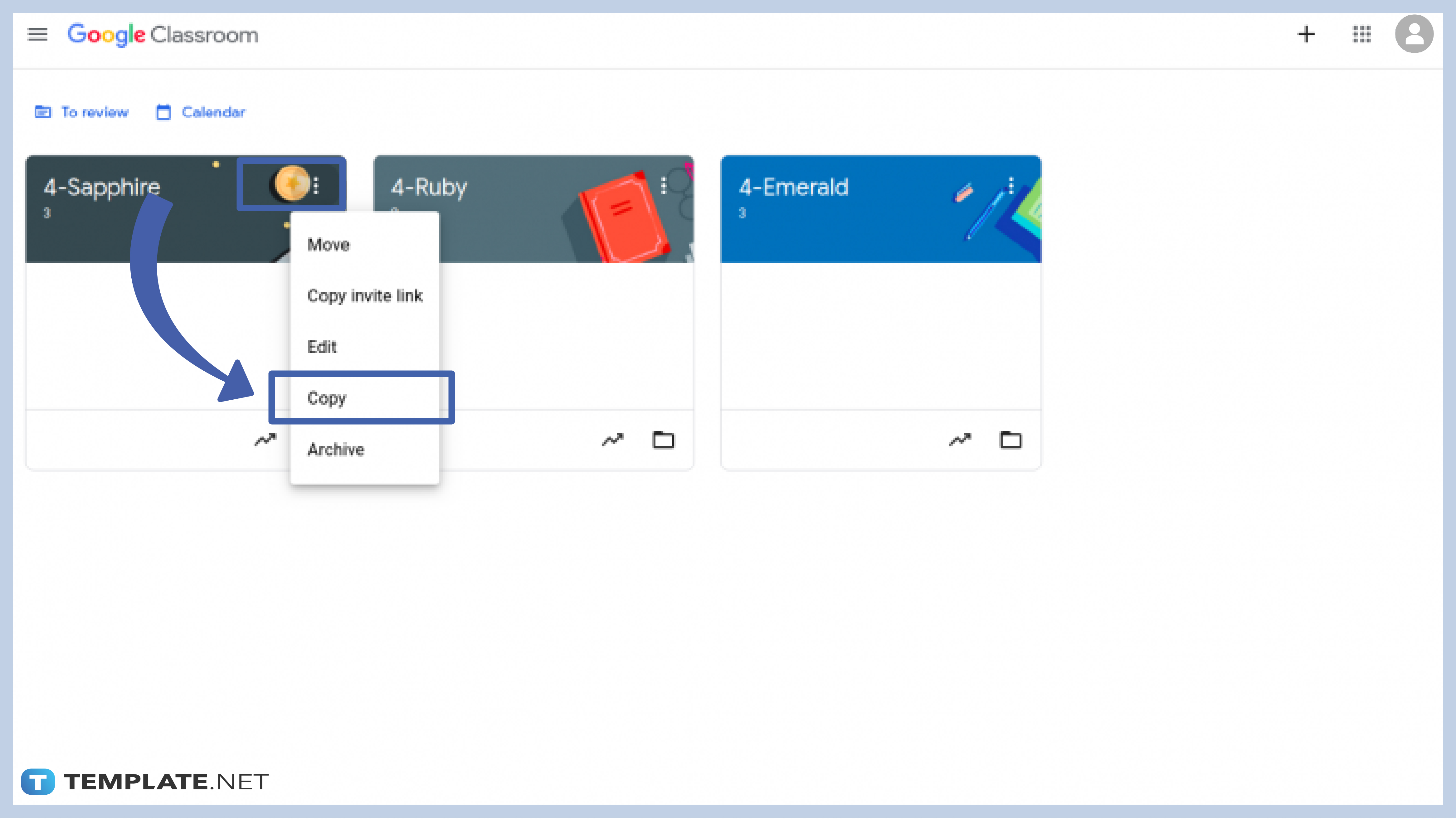
Here are the steps:

1) Prepare the old classroom: remove or note# classwork materials that didn't work or needs revision.

*Note that if you don't want copies of materials, don't copy your classroom with files attached to assignments. 

2) Make a copy!

3) Update the files, if needed, as you go. This is where the # system is helpful.

Now, if you didn't love how your classroom was organized last year OR you want to make some updates to your classroom copy, check out the video below for some useful tips:


Friday, June 2, 2023

Try Something New as the Year Draws to a Close

The end of the school year is a great time to try something new. Although the best time for "something big" this is in the last month, if you have a lesson idea or tool you are thinking about for next year, why not try it now, when you and your students have less to lose?

One example that many teachers in GPS are trying is the Building Thinking Classrooms approach. While there is plenty written about it that teachers can explore, the crux of the approach is that instead of starting a lesson with direct instruction, the teacher uses more of an inductive learning method by giving students novel "thinking tasks" to work on, ideally in groups.

The creator of this method, Peter Liljedahl, shares the realization that if we want students to push through difficult problems and find their own solutions, we have to create situations that provide opportunities and support for this.

“By and large students spend most of their class time not thinking, at least not in ways we know they need to think in order to be successful in mathematics.” Liljedahl explains. “If they’re not thinking, they’re not learning.”

Also key are whiteboards, or nonpermanent vertical surfaces that allow students the freedom to fail. Liljedahl shares that research supports this, and it makes sense, because students will "try anything and everything because they feel like they can just erase it if it's wrong".

The same can be said for teaching, especially at the end of the year. Try something new--and if it isn't perfect, that's okay.


Friday, May 27, 2022

End of the Year Technology Clean Up

It's hard to believe the school year is drawing to a close, but given that Chromebook collection is fast approaching for students, there are things for teachers and students to have on their collective radars now to ensure a smooth end of the year AND set you up for a smooth start to next year!


1. Prepare to Archive and Otherwise Secure your Google Classrooms 

Your Google drive will be FILLED with student files if you don't return work. If you've been holding on to student work all term (or all year), now is a good time to return those files. This will save your Google drive from clutter and help you find things faster in the future.

  • This Teaching Channel blog post walks you through the process and includes a helpful video tutorial!
  • One additional tip, for those of you worried about securing assignments for academic integrity reasons, you may also opt to unenroll students from classes. This blog post will explain and walk you through the process.

2. Support Students in Organizing their Google Drive

Once you return work to students, you could give students the opportunity to create a portfolio for their families OR students could organize their work into folders for school applications, Vision of the Graduate reflections, or any number of other reasons.

3. Organize Your Files without Creating Additional Clutter!

  • Use versioning to name this year's file without making copies that clutter your drive.
Instead of making copies, go into the Version History and name the current version. This way, you can have multiple versions of a test, assignment, handout, etc. that is customized based on your group of students, semester, etc. And the great part? You can go back and forth between named versions without losing any of the versions!

  • Place shared files in a shared drive--your team or department will thank you!

Thursday, May 5, 2022

Getting Organized with Google

 Teachers end of the year to-do lists can feel long, and while cleaning up is cathartic and important, it often feels overwhelming.

Thankfully, Google has added some tools that can make your digital clean-up easier.

Two tips teachers have shared as being game-changers involve Google Drive and documents.

1. Use advanced search to quickly find (and then organize) files.

The quick tip video from Google teacher guru Kasey Bell quickly shows how to use the Google search chips to quickly find that file you are looking for, even if you never put them into folders.

This is also a great way to find files "Shared with Me" that you need to add to your drive and organize into folders for easy use in the classroom. For more on this, check out the TLI Educational Technology page.

2. Use named versions to eliminate document overload.

Teacher Tech master Alice Keehler shares that naming versions of documents using version history is a great end-of-year clean-up strategy and a great habit to use all year long!

Many teachers "Make a Copy" of a document when they update it for 2021 or 2022, thinking they may someday want to revert back to the version from 2019. However, this leads to many nearly redundant files in your Drive...and confusion when trying to find "the right" version of the document!

Instead, when you go to update a document for the new year (or close out this year), go to "File," select "Version History" and name your version. This could be with the year, or even a longer descriptive title that indicates the changes made. 

Then, if you make changes and in a couple months or years want to revert back, you can simply "Restore" the desired version. 

This also helps with those users of hyperdocs, as the links in your document won't change. Additionally, Google Classroom teachers who want to "Reuse" assignments from year-to-year can avoid having to change up attachments, making the process even easier.